The ANRPTS portal is the only official platform for Mauritania e-Visa applications. Since January 2025, all travelers who need a visa must apply online through this system before boarding their flight. This guide walks you through the portal, from account creation to checking your visa status.
What Is the ANRPTS Portal?
ANRPTS stands for Agence Nationale du Registre des Populations et des Titres Securises – the National Agency for the Population Register and Secure Titles. It is the Mauritanian government body responsible for managing the country’s electronic visa system.
The portal at anrpts.gov.mr replaced the old sticker visa system. Before January 2025, travelers could obtain visas at Mauritanian embassies, consulates, or on arrival. That process has been fully discontinued. Today, the e-Visa through ANRPTS is the only way to get a visa for Mauritania.
The system handles the entire visa lifecycle – application, document upload, approval, and status tracking – through a single online platform.
How to Access the ANRPTS e-Visa Portal
The official portal URL is https://anrpts.gov.mr. The site is available in both French and English. To switch to English, look for the language toggle on the homepage or navigate directly to anrpts.gov.mr/en.
Creating an Account
To apply for a visa, you first need to create an account on the portal:
- Visit anrpts.gov.mr/en
- Click “Register” or “Create Account”
- Enter your email address and create a password
- Verify your email through the confirmation link sent to your inbox
- Log in with your new credentials
Use an email address you check regularly – all visa notifications, including approval or rejection, are sent to this address.
Logging In
If you already have an account, click “Login” on the portal homepage and enter your email and password. From the dashboard, you can start new applications, check existing ones, or download approved visas.
How to Apply for a Mauritania e-Visa on the Portal
The application process is straightforward and takes about 15-20 minutes if you have your documents ready. Here is the step-by-step breakdown.
Step 1 – Start a New Application
After logging in, click “New Application” or “Request Visa” from your dashboard. You will be asked to select your visa type and duration.
Available durations are:
| Duration | Best For |
|---|---|
| 30 days | Short tourism, transit |
| 60 days | Extended tourism, family visits |
| 90 days | Business trips, longer stays |
Step 2 – Enter Personal Details
The form requires the following information:
- Full name (as it appears on your passport)
- Date and place of birth
- Nationality
- Profession
- Email address and phone number
- Purpose of stay – options include tourism, business, family, medical, cultural/sports, or other
- Planned arrival date in Mauritania
- Number of entries – single, double, or multiple
- Passport details – number, type, issue date, and expiration date
Double-check every field. Errors in passport numbers or names are the most common reason for application delays.
Step 3 – Upload Documents
You need to upload two documents:
- Passport scan – a clear, color scan of the information page of your passport. The passport must be valid for at least 6 months beyond your planned arrival date.
- Passport-style photo – a recent digital photo taken within the last 6 months. It should meet standard passport photo requirements: white background, face clearly visible, no hats or sunglasses.
Accepted file formats are typically JPEG and PDF. Keep file sizes under the portal’s upload limit (usually 2-5 MB per file).
Step 4 – Submit and Pay
After reviewing your application, submit it through the portal. The processing typically takes 3 to 7 business days, though it can be faster or slower depending on the volume of applications.
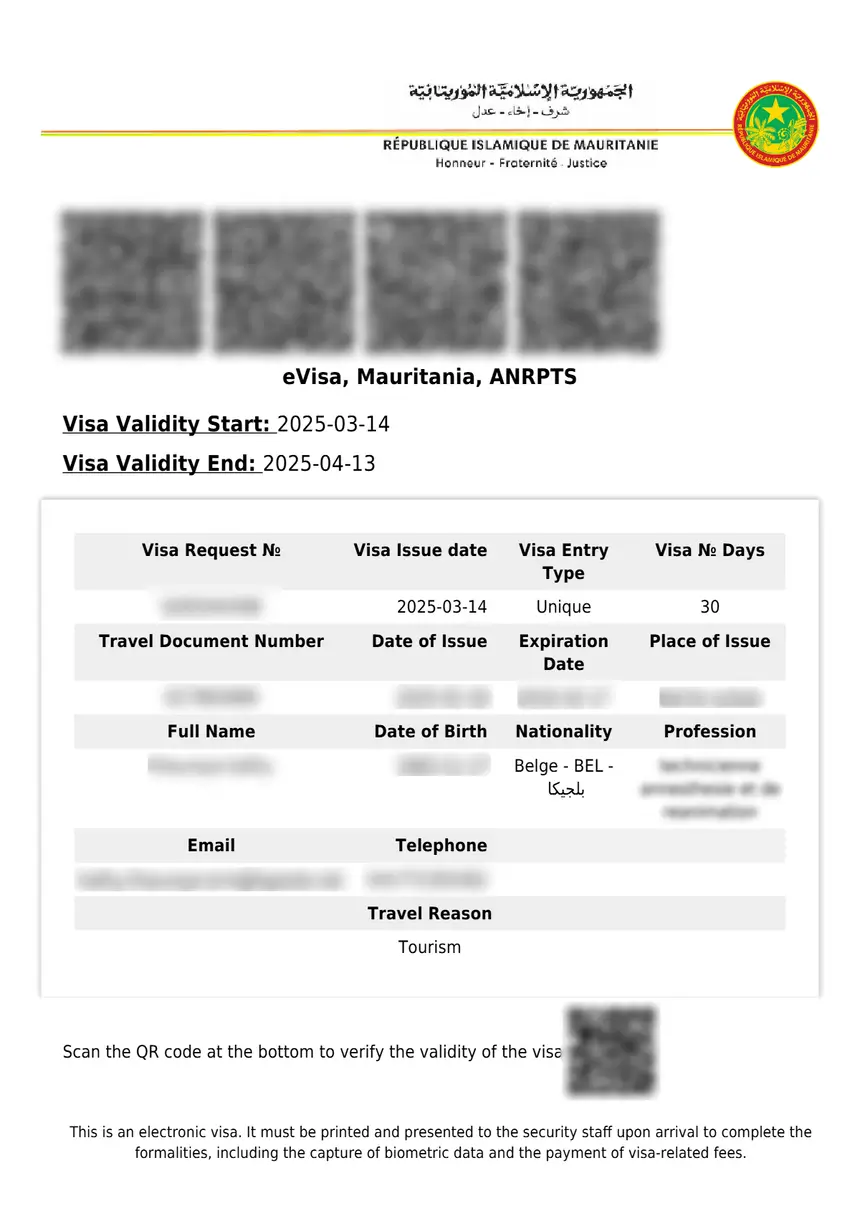
Here is the important part about payment – visa fees are not paid online. You pay the fee when you arrive in Mauritania. The approved e-Visa document (which includes a QR code) must be printed and presented at the border along with the exact cash payment.
Checking Your Visa Status on ANRPTS
You can track your application status at any time through the portal’s dedicated tracking page:
https://anrpts.gov.mr/visatrackpage
To check your status:
- Go to the tracking page
- Enter your application reference number or passport details
- The system will display your current application status
Possible statuses include:
| Status | Meaning |
|---|---|
| Submitted | Application received, awaiting review |
| Under Review | Being processed by authorities |
| Approved | Visa granted – download and print it |
| Rejected | Application denied – see reasons below |
| Additional Info Required | You need to provide more documents |
If your application has been pending for more than 10 business days, contact ANRPTS directly at [email protected].
Visa Duration and Fees on the Portal
When applying through the ANRPTS portal, you choose your desired visa duration. Fees are paid on arrival in Mauritania in exact cash – either Euros or US dollars. Change is not given, and no receipts are issued.
| Visa Duration | Fee (EUR) | Fee (USD) |
|---|---|---|
| 30 days | EUR 55 | USD 60 |
| 60 days | EUR 65 | USD 70 |
| 90 days | EUR 80 | USD 85 |
For full details on all fees, visit our Mauritania visa fee guide.
Your printed e-Visa document includes a QR code that border officials will scan upon arrival. After scanning, they will capture your biometric data to finalize your entry.
Common Issues and Troubleshooting
The ANRPTS portal is still relatively new (launched January 2025), and applicants have reported some recurring issues:
Portal is slow or unresponsive. The ANRPTS site can experience downtime or slow loading, especially during peak travel periods. If the site does not load, try again in a few hours or use a different browser.
Application stuck on “Submitted.” Processing can take 3-7 business days, and sometimes longer. If your application has been pending for more than 10 days, email [email protected] with your application reference number.
Document upload fails. Make sure your files are in JPEG or PDF format and within the size limit. Reduce file size if needed before uploading.
No confirmation email received. Check your spam/junk folder. If you still cannot find it, try logging back into the portal – your application status will be visible on the dashboard.
Name or passport number mistake. If you notice an error after submitting, contact ANRPTS by email immediately. Minor corrections may be processed, but significant errors (wrong passport number, incorrect name spelling) may require a new application.
For more on handling rejected applications, see our guide on what to do if your Mauritania eVisa is rejected.
Frequently Asked Questions
How do I apply for a Mauritania e-Visa?
You apply through the official ANRPTS portal at anrpts.gov.mr. Create an account, fill in the application form, upload your passport scan and photo, then submit. Processing takes 3-7 business days. You pay the visa fee on arrival in Mauritania.
How long does it take to get a Mauritania e-Visa?
Processing typically takes 3 to 7 business days after submission. Some applicants report receiving approval in as little as 1-2 days, while others wait up to 2 weeks. Apply well in advance of your travel date.
How much does a Mauritania e-Visa cost?
A 30-day visa costs EUR 55 (USD 60). Longer durations are available – 60 days for EUR 65 and 90 days for EUR 80. Payment is made in cash on arrival, not online.
Do US citizens need a visa for Mauritania?
Yes. US citizens must apply for an e-Visa through the ANRPTS portal before traveling to Mauritania. There is no visa-on-arrival option since January 2025.
Can I get a visa on arrival in Mauritania?
No. Since January 5, 2025, Mauritania has discontinued visa on arrival. All travelers who need a visa must apply through the ANRPTS portal before departure.
What if the ANRPTS portal is not working?
The portal can experience downtime. Try clearing your browser cache, switching browsers, or accessing the site at a different time. If the problem persists, contact ANRPTS at [email protected].
Is the ANRPTS portal the only official way to get a Mauritania visa?
Yes. The ANRPTS portal at anrpts.gov.mr is the only official platform for Mauritania e-Visa applications. Third-party visa services may offer to process your application, but they charge additional fees and use the same ANRPTS system underneath.